ch-ad

Showing posts with label wqvga. Show all posts

December 16, 2010

Omarket - a free app marketplace for windows mobile ( Opnmarket )

...Now that doesn't mean that just the market app is free (though that is true), but also that all the apps you find and download from the market are also freeware. As far as I can tell this app is from freewarepocketpc.net itself which already makes it awesome. And while it may stop your from coming back to my site (I mean this site), it just goes to show how much I like you guys that visit my site. So go ahead, download the damn thing, it's great!


O!market , the free app store...
Instant free downloads for your Windows Mobile phone,
enjoy installing applications natively !

Features
- Showcase brings you the latest and most popular free apps
- Categories, browse thousands of organized apps
- Search for freeware
- My Apps lets you get updates for your previously installed apps
Omarket is compatible with most of the Windows Mobile Professional devices with touch-screens, once installed it lets you browse, download and install FREE applications directly on your device. Omarket will use you mobile network connection or a WiFi connection to download softwares to your phone. It's simple, instant and FREE !

November 24, 2010

Twitter Apps Roundup for Windows Mobile Pocket PC


Twikini 

Features

  • FAST! Unlike other Twitter apps for Windows Mobile, Twikini is written entirely in native C++ code for maximum performance and the fastest load time possible.
  • Simple, uncluttered, and customizable user interface. Choose from a variety of themes for the best reading experience. 
  • Post tweets using a full screen editor. Optionally, set your location (either manually, using GPS coordinates, or geocoding) along with your status updates. 
  • Send and receive Direct Messages.
  • Twitpic integration to post photos with your status updates. Select existing photos or click new ones from your device's camera. When reading tweets, view Twitpics inline (without having to open a separate browser). 
  • Read status updates just like browsing a web page. Quickly reply, retweet, favorite, or email other people's tweets.
  • Automatically tweet the song and artist you're listening to. See a realtime feed of other people using it on Twitter.
  • URL shortening services including Bit.ly, TinyURL and Digg.
  • Browse websites using Skweezer.
  • Single download that is compatible with all Windows® Mobile Devices- both touch and non-touch.
  • Fully localized in German, Italian, Danish, Dutch. More coming.
  • And lots more...
Requirements


Twikini supports all Windows® Mobile phones, which includes versions 5, 6, 6.1 and 6.5. This includes both Pocket PC and Smartphone devices, which are also known as "Professional" and "Standard" Edition. Twikini is not designed for iPhone, BlackBerry, Palm or any platform other than Windows® Mobile.


Quakk

Open Source Windows MobileTwitter Application
Quakk is a similar windowsmobile app.


Twitoday

Once installed, this adds a textbox to the Today screen of a Windows Mobile phone. To send a 'tweet', fill your text into the text box and hit 'OK'.

Tap on the twitter icon to launch the mobileTwitter website and read your friend's updates.

Requirements


The application was written for WindowsMobile 5/6 touchscreen PDAs.


November 21, 2010

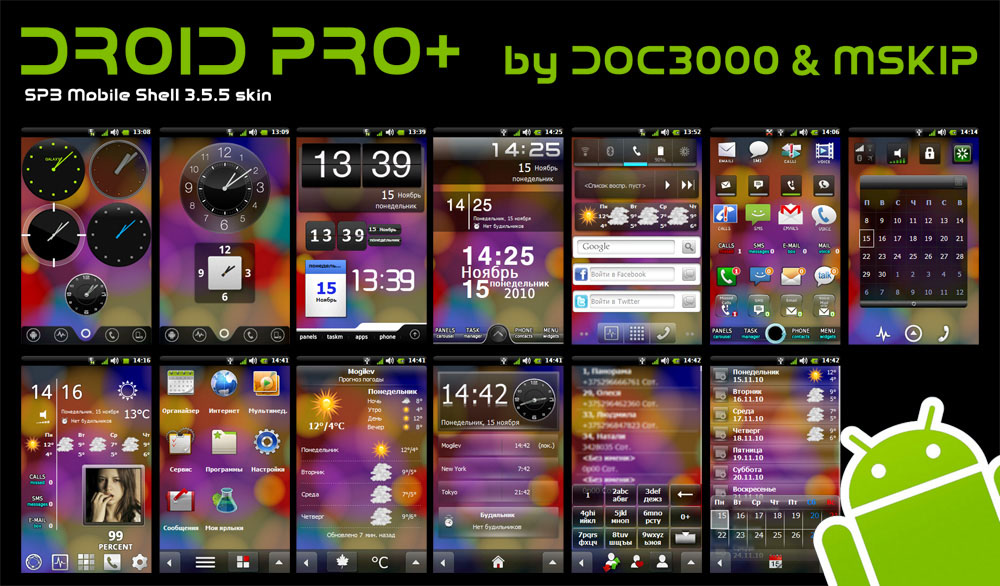
New Android Theme for SPB 3.5 on Windows mobile: DROID PRO+


DOC3000 & MSKIP have released a new android skin for Spb Mobile Shell 3.5.5. This is actually the current skin that I use on my HTC Prophet. I've used it for a few days now, and all is looking very good, and working good as well. 


It works on qvga and wqvga device screens. You must have SPB Mobile Shell 3.5 installed.


In the same forum thread at xda-developers you can find a weather icons pack and some really awesome wallpapers. You can download all of them over at the xda-developers thread:


DROID PRO+ by DOC3000 & MSKIP


also, here are some of the weather icon pack screenshots, and wallpapers


November 17, 2010

WinStart - An animated start menu replacement (Beta)


It works on windows mobile 6, 6.1 and 6.5.  qvga, wqvga, vga, wvga, square compatible.

It replaces the start menu with an animated launcher that has some nice animations and shows some customization. Haven't tried it yet on my prophet, but I'll be sure to do a review of it soon.

MADE BY petititi
New Start Menu Beta_2

Bellow you have a video from the developer showing the plugin.

Windows Phone 7 Theme For Windows Mobile 6.5 WQVGA


FEATURES:
-Landscape mode
-New page in music+video hub
-Office hub redesigned
-Some icons changed
-Weather page redesigned
-For more watch the video
-The "peopel","pictures","xbox live" and "music+videos" icons, are not more animated but the images and scripts are still there if you want animation


HOW TO INSTALL:
1. Install WAD2
2. Install MortScript.
3. Copy folder "WP7_pecco" and the folder "WP7_pecco2" in My Device\Program Files\Lakeridge\WisBar Advance Desktop\Themes
4. Open WAD2 and select "WP7_pecco" as portrait theme and "WP7_pecco2" as landscape theme
5. Link the weather icons (Large,Medium,Small)
6. Soft reset
7. Enjoy


The theme is made by khrisstyan

download it from the xda-developers thread here:

Windows Phone 7 Theme For WAD2 by Khrisstyan l WQVGA l